graphics interface
graphics interface
[′graf·iks ¦in·tər‚fās] (computer science)
A user interface that displays icons to represent objects.
McGraw-Hill Dictionary of Scientific & Technical Terms, 6E, Copyright © 2003 by The McGraw-Hill Companies, Inc.
graphics language
A high-level language and programming interface used to create graphics images. Graphics applications make programming calls to the APIs of the language, and the graphics drivers render the images on the screen or printer. The major graphics languages are GDI, DirectX, QuickDraw, Display PDF and OpenGL. Windows uses GDI and DirectX, while the Mac uses QuickDraw and Display PDF. OpenGL drivers are available for Windows and Unix and the Mac via X Window. See graphics engine, GDI, DirectX, QuickDraw, Display PDF and OpenGL.
GUI
(Graphical User Interface) The common method of interacting with a computer that allows any image to be displayed on screen. Except for entering text on the keyboard, the primary way the computer is operated is with a mouse or touchpad pointing device. The mouse/touchpad is used to select icons and menu options as well as move and resize windows that frame the application and elements within it. The major GUIs are Windows and Mac along with GNOME and KDE for Linux.
From Characters to Graphics
With the advent of the Mac in the mid-1980s and Windows in the 1990s, GUIs replaced the character-based display with a graphics display that eliminated the need to enter cryptic commands in a required sequence. In addition, fonts could be changed and resized on screen, providing a what-you-see-is-what-you-get (WYSIWYG) capability for creating printed materials. However, all major operating systems still include a command line interface that lets programmers and power users enter commands to perform certain tasks faster and more easily than with a mouse (see command line). See user interface, UI types, drag and drop, desktop manager, window manager and Star.
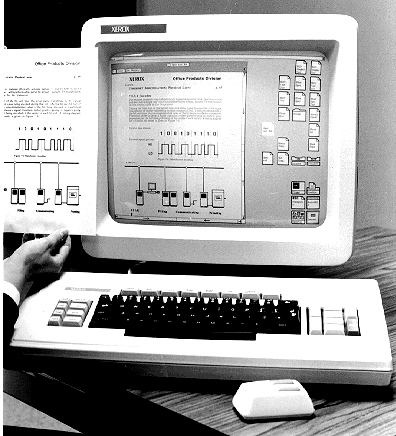 |
| The First Commercial GUI |
|---|
| Xerox's Star workstation was the first commercial implementation of the GUI. Introduced in 1981, the Star was the inspiration for the Mac, which debuted in 1984. (Image courtesy of Xerox Corporation.) |
 |
| The Mac GUI |
|---|
| The top screenshot is an early Mac desktop ("Power Dude" was the name of the hard disk). Notice the difference between the icons, fonts and window borders on the old interface compared to the Mac window (bottom). (Top screenshot courtesy of Peter Hermsen.) |
 |
| The Mac GUI |
|---|
| The top screenshot is an early Mac desktop ("Power Dude" was the name of the hard disk). Notice the difference between the icons, fonts and window borders on the old interface compared to the Mac window (bottom). (Top screenshot courtesy of Peter Hermsen.) |
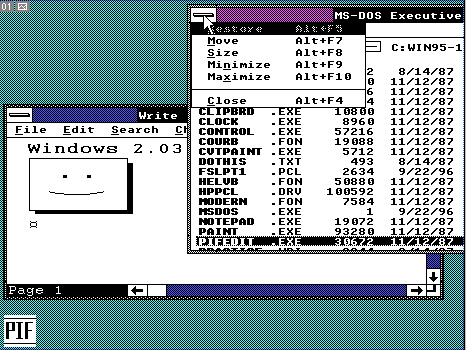 |
| Early Windows |
|---|
| This was the Windows 2.0 interface in the late 1980s. As rigid as it looks, it was an improvement over Windows 1.0 because it supported resizable windows that could overlap. (Image courtesy of Ian Albert, www.ianalbert.com) |
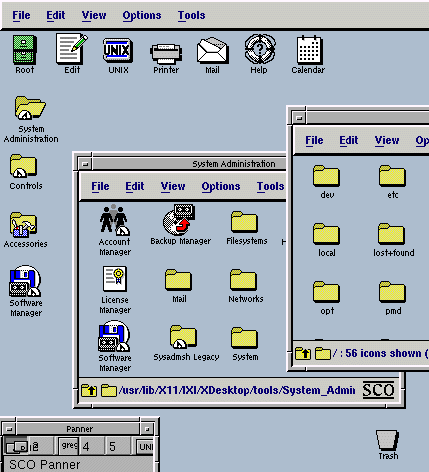 |
| Unix Workstations |
|---|
| The Motif graphical interface was added to the command-line world of Unix workstations in the 1980s. (Screenshot courtesy of The Santa Cruz Operation, Inc.) |
 |
| A Design Revolution |
|---|
| GUIs enabled imaginative interfaces. In this earlier Bryce 3D modeling program, the bottom left symbols were camera controls (trackball and x, y, z axes). On top were primitive graphic elements. (Screenshot courtesy of MetaCreations Corporation.) |
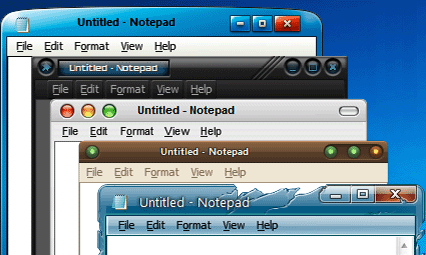 |
| Custom Looks for Windows |
|---|
| Stardock's WindowBlinds allows Windows users to have a unique desktop with thousands of pre-built designs to choose from. (Image courtesy of Stardock Corporation, Inc., www.stardock.com) |
Copyright © 1981-2025 by The Computer Language Company Inc. All Rights reserved. THIS DEFINITION IS FOR PERSONAL USE ONLY. All other reproduction is strictly prohibited without permission from the publisher.
Copyright © 2003-2025 Farlex, Inc
Disclaimer
All content on this website, including dictionary, thesaurus, literature, geography, and other reference data is for informational purposes only. This information should not be considered complete, up to date, and is not intended to be used in place of a visit, consultation, or advice of a legal, medical, or any other professional.






